Doza Assist for Communications Teams.
The presser ends and everyone wants the same thing: what exactly was said, and by whom. Doza Assist transcribes the recording on the Mac in the room, names the speakers, and drafts a quote sheet you can check, edit and send, without the audio leaving the building.
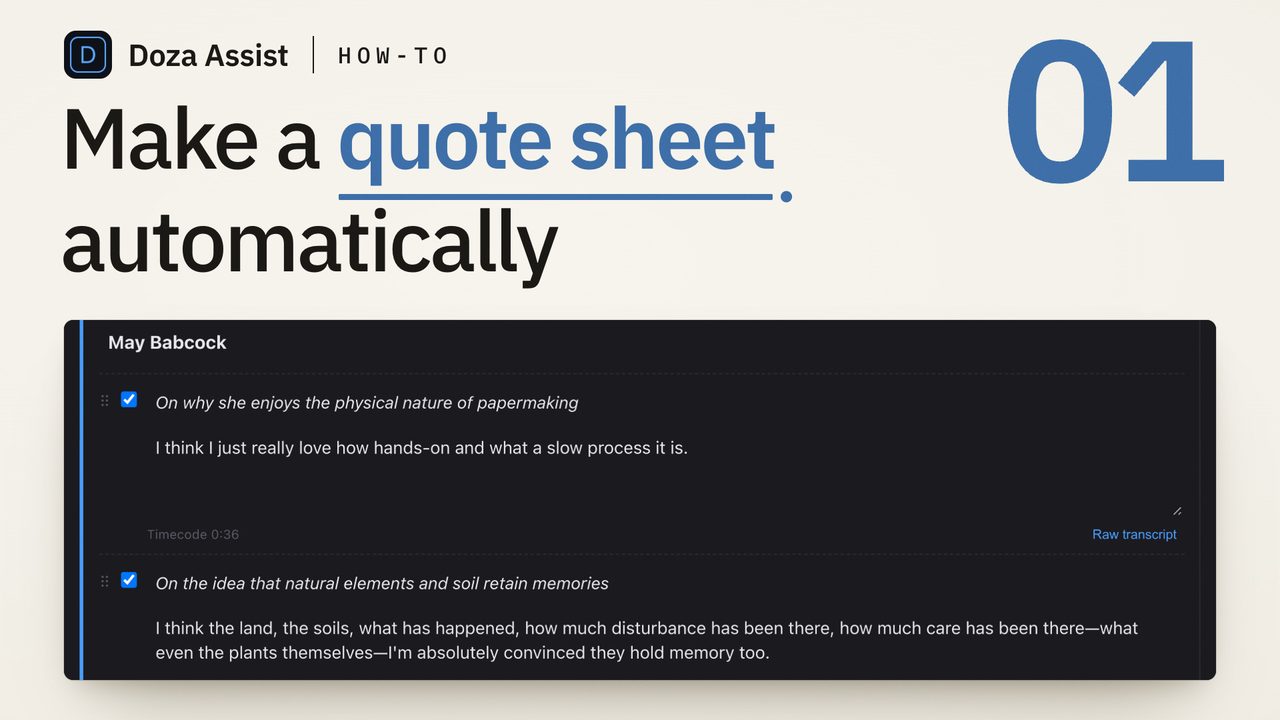
Doza Assist is a local-first AI assistant for transcripts and quote sheets. It transcribes press conferences, briefings, town halls and interviews on your Mac, separates and names the speakers, and drafts a quote sheet: featured quotes grouped by speaker under “On …” topic lines, plus a full Q&A index with times. Export it as PDF, Word or Excel. By default nothing uploads; transcription, speaker ID and the AI all run on the Mac.
01How does a quote sheet come together in Doza Assist?
A quote sheet is a race between the clock and getting it right: reporters are filing, the video team wants the soundbite, and someone has to be sure every name is spelled correctly. Here is the whole path from the recording to the page, following a made-up press conference:
 Doza Assist
-
01 · The presser
Eighteen minutes at the podium. Then drag it in.
The general manager and the chief engineer take nine questions, and every outlet in the room wants the same thing: what exactly was said, and by whom. Drag the recording onto Doza Assist, the same way you’d drop in any file.
-
02 · Transcribe
Every word, without leaving the room.
Doza Assist transcribes it on the Mac you brought to the event, with a timestamp on every word. Nothing uploads, so unreleased remarks and embargoed news never pass through someone else’s servers.
- Word-level timestamps
- Works offline
- About 100 languages (non-English needs a one-time download)
-
03 · Speakers
Names, not “Speaker 2.”
Speaker ID separates the voices, then names them from the introductions and the way people address each other: the moderator’s opening does most of the work. Questions from the floor stay marked as reporters. Fix a spelling once and it holds everywhere.
- Built in, no account
- Your renames always win
-
04 · Auto Generate
The quotes, pulled and filed.
On the Clips tab, Quote Sheet › Auto Generate reads the transcript and drafts the strongest quotes for each speaker, named with their title (General Manager Dana Whitfield), each under an “On …” line that says what it’s about. The first time, it asks for Event Metadata: the event title, date, place, type, your contact block and a distribution notice.
- Aims for 1 to 4 quotes per speaker
- “On …” topic lines
-
05 · Q&A index
The questions, on the clock.
Below the featured quotes, a full Q&A index lists the questions and topic shifts, grouped by who answered, with the time range: “On fares for the first month... (5:40 to 6:18).” A reporter asking what was said about fares gets an answer in seconds.
-
06 · Review
Clean enough to print, easy to check.
Featured quotes are cleaned for print: the ums and false starts go, the meaning stays. Each quote keeps its raw text and timecode one click away, and in the Press / Comms style Promote copies an indexed answer’s transcript in word for word. Edit, reorder, untick a line that shouldn’t go out; edits save as you go. Each time you regenerate, the draft it replaces goes into Versions (the last ten are kept) and can be restored.
- Raw text and timecode per quote
- Include or leave out
- Promote: verbatim in Press / Comms
-
07 · Out the door
A sheet reporters can file from.
Export a PDF or Word file in the plain Press / Comms style or Branded with the event header and your contact block, or an Excel sheet with one row per quote and index entry. It lands in your exports folder; how it goes out, by email, portal or press table, stays your call.
- PDF · Word · Excel
- Press / Comms or Branded
-
08 · Video team
Same answers, on the timeline.
The answers you tag + Quote are clips in the Clip Library too. Tick them and export to Final Cut Pro, DaVinci Resolve or Premiere Pro, and the social cut starts from the same moments the sheet quotes. In Final Cut Pro, each clip carries its spoken words in its Notes.
- Final Cut Pro · Resolve · Premiere Pro
- Words in clip Notes (Final Cut Pro)
02Why local matters for comms
The recordings a comms team handles are often the most sensitive audio in the building: unreleased earnings remarks, embargoed announcements, a CEO’s town hall, an executive answering hard questions off the cuff. Sending that audio to a cloud transcription service puts it on someone else’s servers before your own release goes out, and a growing number of universities and companies now restrict third-party AI transcription and note-taking tools for exactly that reason.
Doza Assist runs the whole pipeline on your Mac: transcription, speaker ID and the AI that drafts the sheet. Once it’s set up, it works with the network off, in a stadium basement or a hotel ballroom with bad Wi-Fi, and there is no per-minute bill, however many pressers you run in a season.
03What the quote sheet does, and what it doesn’t
- Cleaned, not rewritten. Featured quotes drop fillers, false starts and repeated words so they read well in print, without changing the meaning or adding words. The editor keeps each quote’s raw text and timecode a click away, and in the Press / Comms style, Promote copies the transcript for an indexed answer’s time range word for word, so trim anything that isn’t the answer.
- One recording, one sheet. Drop in several pressers and each becomes its own project, with its own sheet.
- After the event, not live. It works from the recording file, not a live feed.
- You send it. Exports land in your Doza Assist exports folder as PDF, Word or Excel. Distribution, approvals and sign-off stay in your own process.
04Frequently asked by comms teams
Which events does the quote sheet handle?
Any recording of people talking. The event types cover press conferences, media availabilities, earnings calls, keynotes and speeches, panel discussions, interviews, briefings, hearings and testimony, and postgame pressers, plus a custom type of your own. On a Mac with 16 GB or more, Auto Generate reads about an hour of speech in one pass; for longer recordings, such as a full hearing, check the Q&A index against the recording.
Are the quotes verbatim?
Featured quotes are lightly cleaned by default: fillers and false starts come out, the speaker’s words and meaning stay. In the editor, each quote’s raw text and timecode are one click away, so you can check a line against the recording before it goes out, and in the Press / Comms style, Promote brings any indexed answer in word for word.
What goes on the page?
Event Metadata holds the event title, date, location and type, your organization and contact block, a distribution notice such as FOR IMMEDIATE RELEASE or an embargo line, and a footer note. The default Press / Comms style prints only the speaker names, “On …” lines, quotes and the Q&A index, and the event title names the file. Branded adds the event header, italic lead-ins and a footer with the notice and contact block.
Can the video team use the same moments?
Yes. Tag clips with + Quote and choose From Tagged Clips to draft featured quotes from just your picks (the Q&A index comes with Auto Generate). Then tick the same clips and export them to Final Cut Pro, DaVinci Resolve or Premiere Pro; in Final Cut Pro each clip carries its spoken words in its Notes.
Does it get names right?
Speaker ID names people from their introductions and the way they address each other, and it never invents a name. Anything it hears wrong, you fix once: rename the speaker, or double-click a word in the transcript to correct it.
What formats does it export to?
PDF and Word (.docx), in the plain Press / Comms style or Branded with the event header, italic topic lead-ins and a contact footer, plus Excel (.xlsx) as a sortable table with one row per quote and index entry.
Does it upload the audio?
No, not by default. Transcription, speaker identification and the AI that drafts the quote sheet all run on your Mac, and once it’s set up it works offline.
Doza Assist: transcription, Speaker ID, quote sheets and NLE export, all on your Mac.
Free trial: every feature on your first 2 minutes — no account, no card · 30-day money-back guarantee · Requires a Mac with Apple Silicon (M1 or later)