
Doza Assist for Legal Video Teams.
Eight hours of deposition video under a protective order, and one question that matters: where, exactly, did the witness say it? Doza Assist makes the full record searchable — transcribed, speaker-labeled, verifiable to the frame — on a single Mac that never sends a byte anywhere.
Doza Assist is a local-first AI editing assistant for confidential video review. Legal video teams, litigation support, and government media offices use it to transcribe deposition and hearing footage offline, label witness and counsel by voice, search any phrase, and hand the team a Quote Sheet — all on one Mac, with nothing uploaded. $199 one-time.
01How do you search hours of testimony video without uploading it?
Somewhere in day two of the deposition, the witness contradicted the declaration. Scrubbing for it burns an afternoon; sending sealed footage to a transcription website isn't an option at all. Doza Assist runs the whole finding pass on the review machine:
- Load the record. Deposition video, hearing footage, recorded proceedings — straight from the drive to the app. There is no account, no upload, and no copy created anywhere but that Mac.
- Transcribe locally. Every word gets a timecode. Hours of testimony become text you can search in seconds, produced entirely on-device — the machine can be disconnected from the network the whole time.
- Let Speaker ID separate the voices. Witness, examining counsel, opposing counsel, the judge — each labeled automatically, and kept straight even when an objection lands on top of an answer.
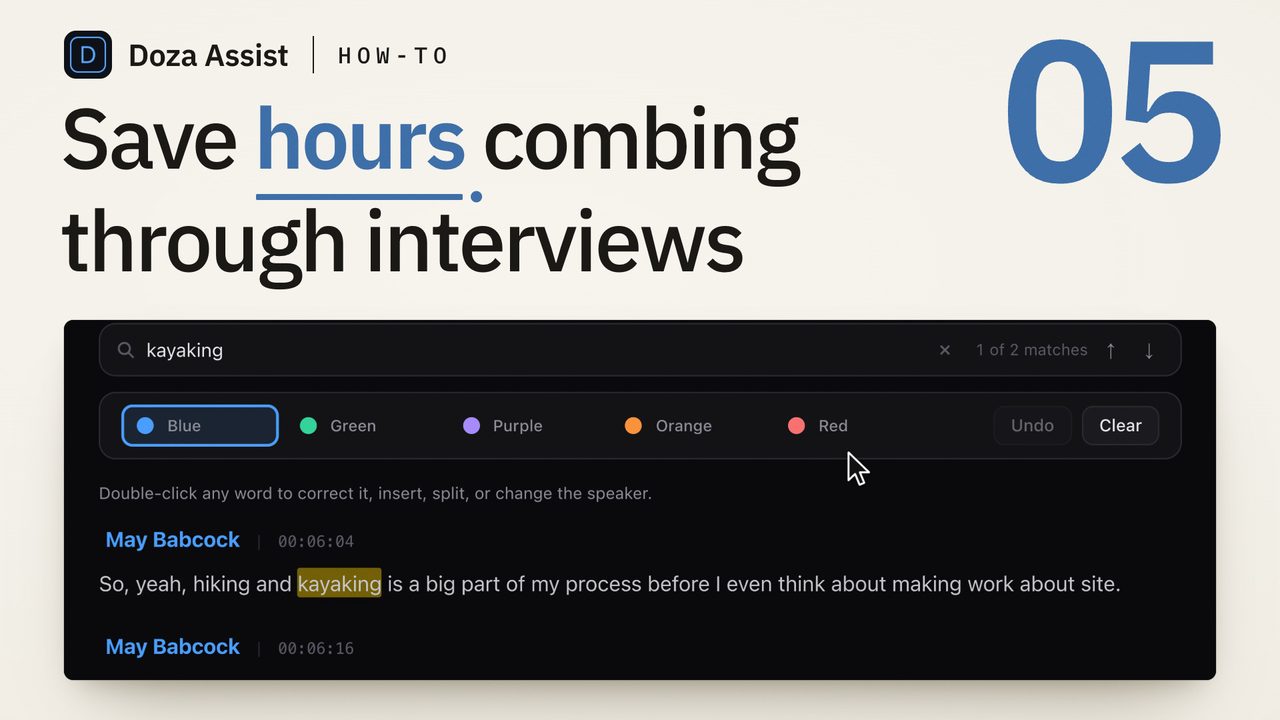
- Search the phrase, verify the wording. Type what you half-remember and jump to every hit. Click any word to land on the exact frame it was spoken, so the team quotes what was said — not what someone recalls.
- Tag by issue and pull the passages. The 5-color highlighter marks testimony by issue — timeline, damages, credibility, whatever your matter needs. Export the flagged passages as a Quote Sheet in PDF or Word, and if you're producing excerpt reels, send clips to Final Cut Pro, Premiere Pro, or DaVinci Resolve.
02Why can't this footage go near a consumer cloud service?
Privileged communications. Material under a protective order. Sealed testimony. Recordings in active matters carry obligations that a consumer transcription service simply cannot meet — the moment the file uploads, a third party holds a copy, and now that copy is something you have to account for.
Doza Assist removes the problem at the architecture level rather than the contract level. Transcription, speaker labeling, search, and analysis all execute on the reviewing machine. There is no vendor processing step because there is no vendor: the software runs where the evidence already sits. Every organization's obligations differ, so confirm the approach with your own compliance or ethics counsel — but "the recording never left this Mac" is a position you can actually defend.
Agency review of hearing footage, city council sessions, board proceedings, internal-affairs recordings — public-sector media teams run the same finding pass on machines that never transmit data to an outside vendor. One flat license per reviewer, purchasable as a single line item, with no ongoing service relationship to justify.
03Is Doza Assist litigation-support software?
No — and it's worth being precise about this. Doza Assist does not produce page:line-cited transcript formats, does not manage designation workflows, and has no trial-presentation export. Certified transcripts remain the work of court reporters, and deposition designations remain the work of your litigation suite. Nothing here replaces either.
What it does is the pass those tools aren't built for: turning hours of raw testimony or hearing video into something one person can interrogate in an afternoon. Locate the moment the witness said it. Check the wording syllable by syllable against the frame. Hand the team the passages in a document they can open anywhere. Then move the citations and designations into the tools built for them.
| Doza Assist | Cloud transcript service | |
|---|---|---|
| Where testimony video processes | On one Mac, offline | Vendor servers hold a copy |
| Runs on an air-gapped machine | Yes | No |
| Cost across hours of footage | Flat $199 one-time | Per-minute or subscription |
| Witness vs. counsel labeling | Automatic, survives crosstalk | Varies |
| Verify a quote against the frame | Click any word to jump to it | Varies |
| Page:line litigation formats | No — pair with your litigation suite | Varies; not certified |
04Frequently asked by legal video teams
Are the transcripts certified or admissible?
No. Certified transcripts come from court reporters, and nothing produced by Doza Assist substitutes for one. This is a review tool: it exists so your team can find the moment, verify the wording against the video, and know precisely what to request or designate through proper channels.
Can we use it on privileged or protected material?
The architecture is built for exactly that situation: recordings are processed entirely on the machine they already sit on, with no third party in the chain and no server-side copy created. That said, obligations vary by matter, order, and jurisdiction — confirm the workflow with your own compliance or ethics counsel before relying on it.
Does it generate page:line citations?
No. Transcripts are timecoded to the word, not paginated to a certified page:line format. Use Doza Assist to locate and verify the testimony, then carry the citation work into your court transcript and litigation-support tools.
Will it run on an air-gapped review machine?
Yes. Every function — transcription, speaker labeling, search, highlighting, Quote Sheet export — works with no internet connection at all. It requires a Mac with Apple Silicon (M1 or later) and 16GB of unified memory minimum.
Doza Assist — offline transcription, Speaker ID, phrase search with click-to-frame verification, issue highlighting, and Quote Sheet export, on the machine the footage already lives on.
Free trial: every feature on your first 2 minutes — no account, no card · 30-day money-back guarantee · Requires a Mac with Apple Silicon (M1 or later)