CREATED BY DOZA VISUALS

Your editing partner.
Learns how you tell stories.

From raw interviews to a rough cut in your editorial voice. Runs entirely on your Mac, by default.
FCP · Premiere · Resolve Local by default · Apple Silicon native
Doza Assist Pro app open on ST Gala 2026: transcript view with multi-color highlights, speaker list, video player, and AI Analysis access
ST Gala 2026 · 46:42 · 515 segments · running locally on a Mac Studio
Local · Offline · Private

Talk to your footage.

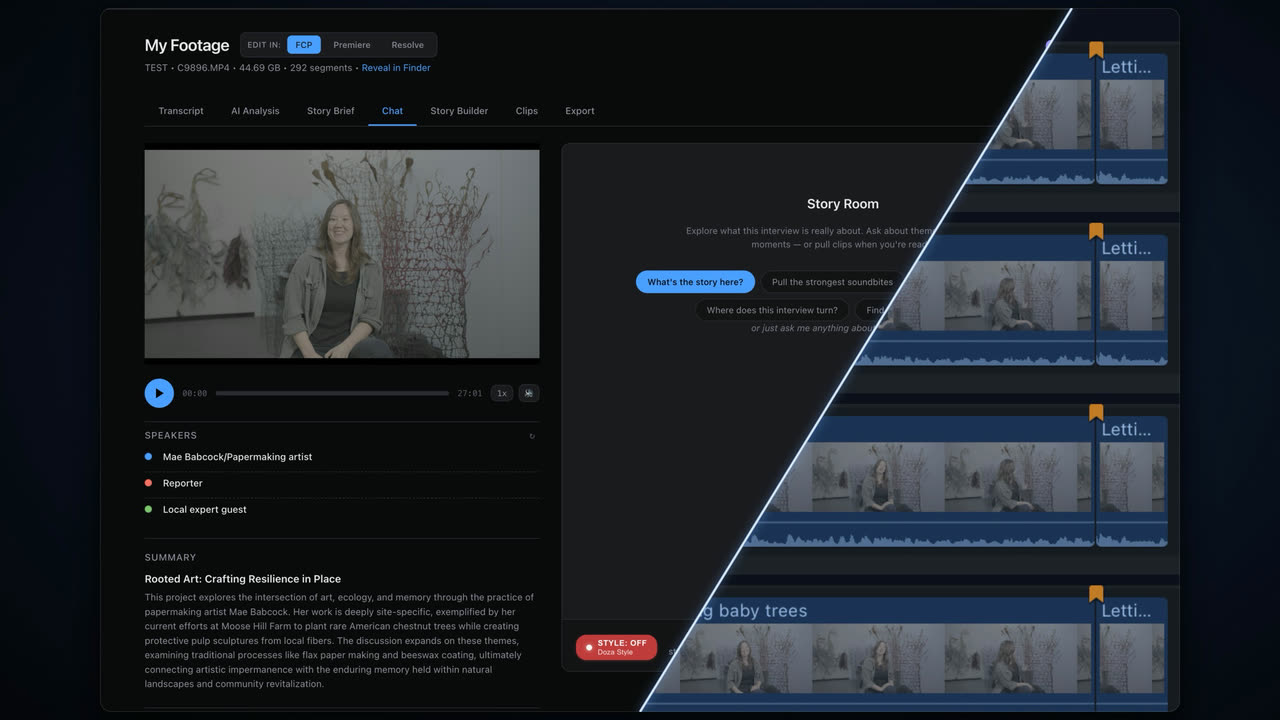
Meet Doza, your editing assistant. Lives on your Mac.

Ask Doza for the best soundbites, a rough story, a tighter sequence. Doza works through your footage right there on your machine and answers in seconds. No cloud account, no AI subscription, no internet required. By default, nothing is uploaded or copied to a server. Turn off the wifi and it still works.

No cloud account No subscription No internet required
Editorial DNA · My Style

Your stories.
Told the way you tell them.

Drop in your finished work. A documentary, a branded piece, a season of episodes. Doza studies how you build a narrative. Where you place the hook. Whether you open cold or build context first. How you order interviews to create tension. What you cut to at a turn. It maps your storytelling patterns and applies them to every new project.

It's like handing your project to an editor
who's studied everything you've ever cut.
My Style dashboard in Doza Assist showing the Doza Style profile, 7 projects analyzed, 17 minutes of total runtime
Inside the profile: What your stories are about — mission-driven, family and community, heritage and legacy Inside the profile: Language you keep and cut, plus the moments you reach for in every project

Build multiple style profiles. One for vérité docs, one for branded work, one for trailers and teasers, one for social cutdowns, one for the showrunner whose voice the whole team needs to match.

AI Analysis

Soundbites, ranked. The lines that carry the story.

Doza watches the room, learns each speaker, and surfaces the pull quotes you'd have flagged yourself — with timecodes and one-line context, ready to drop into your timeline.

Doza Assist AI Analysis: video player, speaker list, and Best Soundbites panel showing ranked pull quotes with timecodes, one-line context, and an Add All Clips action
What you actually get

From transcript to first cut.

Doza reads the room, finds the beats, surfaces the soundbites, and hands you a sequence ready for your timeline.

01Story Builder

A sequence, ready for your timeline.

Story Builder result in Doza Assist: five ordered segments — hook, context, pressure, turn, resolution — with Export to Final Cut Pro and Add All to Clips actions
02Story Beats

The arc, mapped beat by beat.

Story Beats panel: opening hook, mission context, rising action, emotional peak, acceptance, solemn reflection, closing resolution — with FCPX export
03Social Clips

Cutdowns tagged for each platform.

Social Clips panel: viral moments tagged Instagram Reels, TikTok, LinkedIn, YouTube Shorts — with FCPX export button
04Cross-Speaker Connections

Threads pulled across every interview.

Cross-Speaker Connections panel: thematic threads grouping quotes from multiple speakers across the project, each sendable to Story Builder
What it does

Your footage has stories in it.
Here's how Doza finds them.

01 / Transcription

Instant Transcription

100+ languages, fully offline. Drop in an hour of dailies and search every word in seconds. No upload queue, no waiting room, no per-minute meter.

02 / Speaker ID

AI Speaker ID

Separates every voice on the track, even in noisy interviews. Crosstalk, overlapping panels, on-camera plus off-camera — each speaker labeled and searchable.

03 / Playback

Word-Level Playback

Click any word in the transcript to jump to that exact frame. Scrub by sentence, by speaker, by intent. Find the line you half-remember in seconds, not hours.

04 / Conversation

Just Ask Doza

Plain-language requests, in your editorial voice. “Tighten the opening to 90 seconds.” “Find the three best lines about leaving home.” It reads your selects, not just the transcript.

05 / Story Analysis

AI Story Analysis

Doza reads your interview corpus and surfaces the narrative beats. Inciting moment, turn, climax, resolution. Tells you what's missing before you go to assembly.

06 / Multicam

Multicam Support

Sync clips, compound clips, and multicam projects. Drop in an 80GB FCP library and Doza reads the 4KB XML. No re-export, no re-transcode, no flattening.

07 / Export

Straight Into Your Timeline

Sends a sequence straight to your Final Cut Pro timeline. Hands Premiere an XML you drop right in. Sends straight to DaVinci Resolve. Clips, markers, ranges, and notes land exactly where you placed them — no re-conform, no broken project.

08 / Selects

Find the Moments That Carry the Story

Doza surfaces your strongest soundbites, pull quotes, and emotional turns across every interview. Stop scrubbing hours of footage looking for the line you half-remember. Ask for it and it's there.

Who it's for

Interviews, keynotes, panels, podcasts.
Doza knows what to do with all of it.

Documentary Editors

20 hours of interviews. Find the story, build the first cut, export to your NLE.

Podcast Production

Video and audio. Pull the best clips, flag the highlights, cut the episode down to what matters.

Corporate Video Teams

Executive interviews, internal comms, event recaps. Get a rough cut to stakeholders the same day.

Agencies and Studios

Client work across multiple brands. Each brand gets its own style profile. Every first pass matches the voice.

Social Clipping

Long-form to short-form. Surface the moments that work as clips and get them into your timeline.

Why Doza Assist

Owned, not rented.

Most AI editing tools rent you access to your own footage. Doza Assist doesn't.

Doza Assist Cloud editing tools
Pricing $199 once, yours forever $30/mo, every month
Total cost over 3 years $199 (or $297 with renewals) $1,080 and counting
Where your footage goes Stays on your Mac Uploaded to a server
Footage stays under your NDA Yes No, processed by a third party
Per-minute caps None Yes
Transcription Unlimited Capped
Works offline Yes No
Export to FCP, Premiere, Resolve Native XML Re-conform required
Learns your editorial voice Yes, with My Style profiles Generic
If the company shuts down Your app keeps working Your access ends
Pricing

Your footage, your machine, your stories.

No cloud uploads, no usage caps, no credit meters.

Pro
$199one-time
No monthly subscription.
Yours forever.
$49/yr for updates after year one. Optional. Your app keeps working either way.
Buy Now
Requires a Mac with Apple Silicon (M1 or later).
Everything in the free version
Pro adds
  • Story Brief. Multi-project analysis. Doza reads across episodes and surfaces patterns.
  • Selects-aware chat. Doza tracks what you've pulled and critiques your assembly. Flags what's missing before you commit.
  • Signed Mac app with auto-updates. No terminal, no setup. Open it and go.
  • Priority support. Direct line to the maker.
Local by default. Nothing leaves your Mac unless you connect your own key.
  • 30-day money back
  • Secure checkout via Paddle
  • Instant download and license key
The Maker

Built by a filmmaker who needed a better workflow.

Chris Cardoza has spent 15 years editing documentaries and branded content for clients like Reebok, TB12 Sports, Yo-Yo Ma and ICA Boston. He got tired of watching the meter run — AI tools that charge by the credit, cap you by the minute, and still send your footage to a server. He built Doza Assist because no tool worked the way he needed: on your machine, in your voice, fast, without a credit balance or a minute counter staring back at you.

The core engine is open source under MIT, free forever, because the editor community deserves tools it can actually trust. Pro is how the project stays funded.

Common questions

The short version.

Does my footage really stay private?
By default, yes. Everything runs on your Mac with no cloud account and no subscription. Nothing is uploaded or sent to any server unless you choose to connect your own API key for optional cloud models. That choice is yours, off by default, and the local experience never requires it.
Do I need an internet connection?
No. Once installed, Doza Assist works completely offline. You can unplug entirely and it still does everything.
Do I need to be technical to use it?
No. It is a normal Mac app. Open it, drop in your footage, start working. No terminal, no setup.
Can I use Claude or OpenAI models?
Yes, if you want to. Doza runs locally by default and works fully offline with no account and no subscription. You can optionally connect your own Claude or OpenAI API key to use those models for specific tasks. It is off by default, it is your choice, and only the work you explicitly send goes to that provider. The local experience never requires it.
What if I edit in Premiere or Resolve, not Final Cut?
You're covered. Doza Assist exports to Final Cut Pro, Premiere Pro, and DaVinci Resolve. Your clips and markers land right where you need them.
What Mac do I need?
Any Mac with Apple Silicon (M1, M2, M3, M4, or later). Intel Macs are not supported. 16GB of unified memory is the minimum we test against; 32GB or more if you work with large multicam libraries.
I already use the open source version. What does Pro add?
The full local engine is open source on GitHub for developers who want to build from source. Pro is the signed, supported, install-and-go Mac app with auto-updates, Story Brief, selects-aware chat, and priority support. Most editors want Pro. Most developers want both.
Can I try it before I buy?
Yes. Doza Assist comes with a 30-day money-back guarantee. If the app doesn't work for you for any reason within 30 days of purchase, email [email protected] and you'll get a full refund. Statutory consumer rights apply on top where local law provides them.
How do refunds work?

Doza Assist comes with a 30-day money-back guarantee. If the app doesn't work for you for any reason within 30 days of purchase, email [email protected] and you'll get a full refund.

Refunds are processed through Paddle, our payment processor and merchant of record, under Paddle's Refund Policy. Credit typically appears on your statement within 7 to 10 business days.

Purchases made through third-party marketplaces or resellers are subject to the refund policy of that platform. Contact the platform directly for refund requests on those purchases.

What happens if Doza Assist goes away?
Your app keeps working. Everything runs on your Mac, so nothing depends on our servers. The work you've done stays yours, forever.
Built in the open

Doza Assist is MIT-licensed open source.

If you'd rather build from source, contribute, or audit the code, the full repo is on GitHub. The Pro app is a signed, packaged, supported build of the same core. Same engine. Less terminal.

View on GitHub