
Doza Assist for Journalists.
The package airs at six and the line you need is somewhere in a 40-minute presser. Doza Assist transcribes it on your own Mac, labels who said what, finds the quote, formats the quote sheet for the desk, and gets the cut to your NLE — and no copy of your source's interview ever exists on a server you don't control.
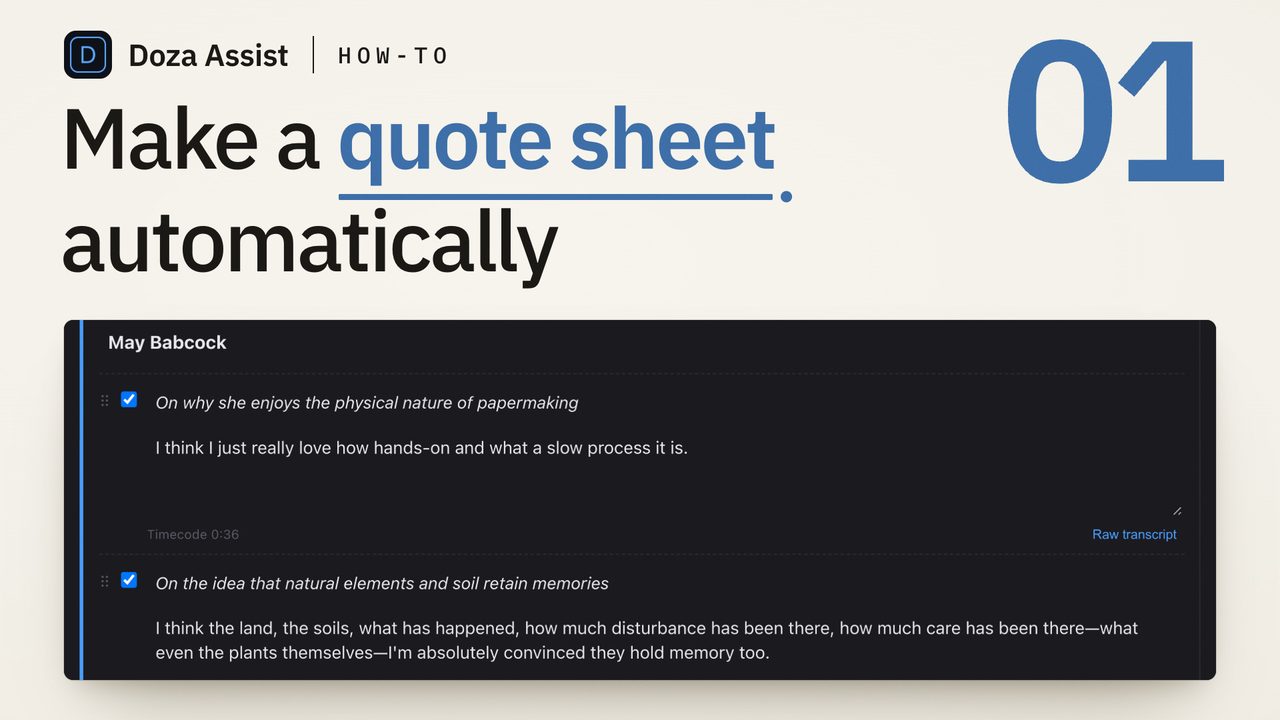
Doza Assist is transcription software for journalists that runs entirely on your Mac. Interviews and press conferences are transcribed offline in about 100 languages with every voice labeled, quotes export as clean PDF or Word quote sheets, and cuts land in Final Cut Pro, Premiere Pro, or DaVinci Resolve. $199 one-time. Nothing uploads, ever.
01How does a news package move through Doza Assist?
Whether it's a scheduled sit-down, a scrum outside the courthouse, or two hours of city council, the path from recording to air is the same:
- Load the recording. Camera card, feed capture, or the file your producer dropped in the shared folder — standard video and audio formats come straight in.
- Get a speaker-labeled transcript, locally. Speaker ID separates every voice — the official at the podium, the aide who cuts in, the reporters shouting questions over each other — and the whole thing is done in minutes, not hours, because there is no upload queue in front of it.
- Search for the half-remembered line. "He said something about the budget being a fiction" — ask in plain language and get timecoded answers, or search the word-level transcript directly. Click any word and you're on that frame.
- Send the desk a Quote Sheet. One click turns the transcript into a clean, formatted pull-quote document as PDF or Word — your producer reads quotes, not raw transcript soup.
- Cut the package in your NLE. Your selects go to a Final Cut Pro timeline, a Premiere Pro XML, or straight to DaVinci Resolve, with markers, ranges, and notes where you put them.
02Why should interview audio never touch a third-party server?
Every cloud transcription account your newsroom holds is a second copy of every interview you've fed it — a copy that lives under someone else's terms of service, someone else's retention policy, and someone else's response to a subpoena. When the story involves a confidential source, that copy is a promise you can't keep.
Doza Assist removes the third party instead of trusting it. Transcription, speaker identification, analysis, and chat all run on the Mac in front of you, and the app works with WiFi turned off. There is no account holding your material, no server to be compelled, and no data-processing agreement to negotiate — because there is no processor. Source protection stops being a vendor's policy and becomes physics.
Air-gapped edit bays, embargoed material, leaked recordings under legal review — Doza Assist runs in all of them, because it never needs a network connection to do its job. There's no vendor DPA to route through legal before you can start, for the simple reason that there is no vendor in the loop. The recording stays on the machine it was loaded onto until you decide otherwise.
03How does it compare to cloud newsroom transcription?
The cloud transcription services built the workflow most newsrooms know: upload the interview, wait for the queue, pay by the minute or by the seat, and accept that the vendor now holds a copy. Doza Assist does the same job with the opposite architecture.
| Doza Assist | Cloud newsroom suite | |
|---|---|---|
| Where the interview is processed | On your Mac, offline | Vendor servers |
| Who else holds a copy | No one | The vendor, per its retention policy |
| Deadline exposure | No upload queue | Upload + processing wait |
| Billing | $199 one-time, unlimited hours | Per-minute or per-seat subscription |
| Speakers in a scrum | Separated and labeled, even crosstalk | Varies |
| Quote sheet for the desk | Formatted PDF or Word | Varies; often raw transcript export |
| Works in the field, no signal | Fully offline | No |
Cloud suites earn their keep where teams need shared browser access to transcripts. Doza Assist is for the reporter or producer who cuts the piece — and whose material can't be someone else's data.
04Frequently asked by journalists
I'm on deadline. How fast is local transcription?
Minutes, not hours, on Apple Silicon — and the wait starts immediately, because there's no upload step and no processing queue behind other customers. Exact speed depends on your Mac and the length of the recording, but a presser is typically searchable before you've finished logging your b-roll.
Can legal or standards review see what the AI saw?
There's nothing to request. No server copies exist — the transcript, the speaker labels, and every AI analysis were produced on your Mac and live only in your project files. What legal reviews is what's on your machine, full stop.
My beat involves heavy accents and multiple languages. Will it cope?
Transcription covers about 100 languages, auto-detected, entirely offline — a bilingual presser doesn't need you to pick a language first. Word-level timing means you can click any word and check it against the tape before it goes in the script.
Does it actually produce quote sheets?
Yes. Quote Sheet turns a transcript into a clean, formatted pull-quote document and exports it as PDF or Word — ready to send to a producer, an editor, or a PR client who will never open an editing app.
We have a MAM / asset-management system. Will this fight it?
No. Doza Assist works alongside whatever manages your media — it reads standard video and audio files and hands your NLE standard XML. Nothing about your ingest, storage, or archive workflow has to change.
Doza Assist — offline transcription, Speaker ID, Quote Sheets, timecoded search, and NLE round-trip, all on your own Mac.
Free trial: every feature on your first 2 minutes — no account, no card · 30-day money-back guarantee · Requires a Mac with Apple Silicon (M1 or later)