
Doza Assist for Worship Media Teams.
A 75-minute service every Sunday, a sermon series that runs to Advent, and a media budget that doesn't need another monthly charge. Doza Assist transcribes each service on the Mac in the booth, finds the moments worth sharing, and hands your selects to the editing app — for a price the board approves once.
Doza Assist is a local-first AI editing assistant for church and worship media teams. It transcribes full services offline on the church's own Mac, finds sermon clip moments, searches an entire series at once, and sends selects to Final Cut Pro, Premiere Pro, or DaVinci Resolve. $199 one-time — no subscription.
01How do you find the shareable moments in Sunday's service?
By Tuesday, someone on the team is scrubbing the sermon looking for the ninety seconds that will carry the week's clip. That hunt is the part Doza Assist takes over — the pastor's words become searchable text before anyone sits down to edit:
- Bring in the service. Sunday's recording, single camera or the full multicam setup. Queue several weeks at once with batch processing and let the booth Mac work through them overnight.
- Get the transcript, every word timed. The whole message becomes searchable text, produced on the machine itself — the recording never uploads anywhere. Click any word to land on that exact frame.
- Ask for the moments. In plain language: "the three strongest moments on forgiveness in this message." Answers come back with timecodes, ready to check against the video.
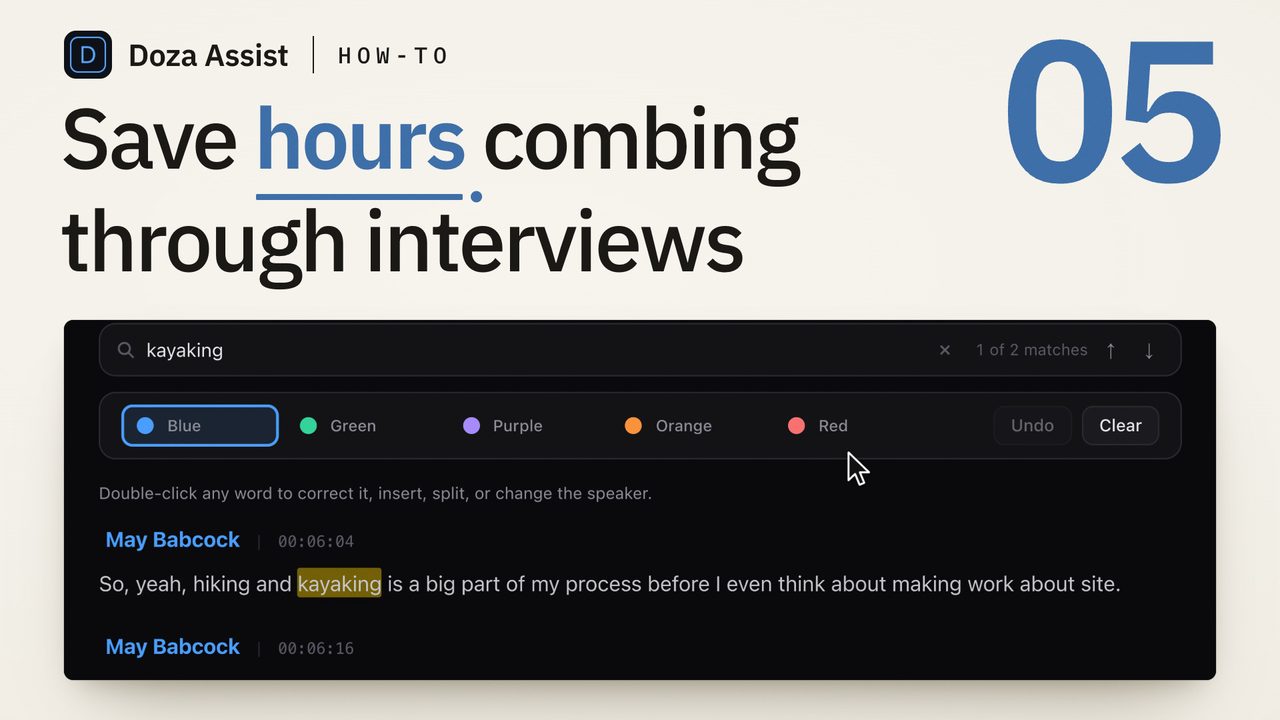
- Sort candidates with the highlighter. Five colors keep the passes separate — midweek clip candidates in one color, chapter markers for the full-sermon upload in another, quotable lines for print in a third.
- Send it to the edit, and to the office. Selects land in Final Cut Pro, Premiere Pro, or DaVinci Resolve with markers and notes attached. A Quote Sheet exports the week's quotable lines as PDF or Word for bulletins, devotionals, and the email newsletter.
02Why does a church board only have to approve this once?
Ministry media budgets die by a thousand renewals. Doza Assist is one purchase: $199 per editor, including a year of updates. After year one, updates are an optional $49, and the app keeps working forever whether you take them or not. There's a 30-day money-back guarantee, and checkout runs through Paddle with an invoice the treasurer can file.
Local processing is what makes the flat price possible — and it fits how churches actually operate. Christmas Eve ran two and a half hours? There's no per-minute meter counting. The livestream Mac has spotty internet? Nothing here needs a connection. Congregants share personal testimonies on camera? Those recordings stay on the church's own machine instead of passing through a vendor's servers.
Collections bind a whole sermon series into one searchable body, so you can ask a question across every week at once. Story Brief reads the arc of the series and shows the through-line the individual messages are building. Come December, pull every mention of a theme across the year's messages and cut the recap video from receipts, not memory.
03Will it caption the clips and post them for you?
No — and that's a deliberate line. Doza Assist doesn't burn in captions, doesn't auto-crop vertical versions, and doesn't publish to social. The sermon-clip subscription services do that part of the job. Doza Assist does the other part: the finding, the searching across a series, and the hand-off into a real editing app where your team controls how the clip actually looks. Many teams pair the two — or let their NLE and caption tool finish what Doza Assist found.
| Doza Assist | Sermon-clip SaaS | |
|---|---|---|
| Where the service processes | On the church's Mac | Uploaded to vendor servers |
| Pricing | $199 once per editor | Monthly subscription |
| Multi-hour holiday services | Unlimited, no meter | Per-minute or plan limits |
| Search across a whole series | Collections span every week | Usually one video at a time |
| Burned-in captions & 9:16 crops | No — your editing or caption tool | Yes |
| Posts directly to social | No | Often yes |
| Hand-off to FCP / Premiere / Resolve | Selects with markers and notes | Varies; often file downloads only |
04Frequently asked by worship media teams
Can volunteers actually run this?
Yes. It's a normal, signed Mac app — install it, drop the service in, read the transcript. No terminal, no setup scripts. The hardware requirement is the main thing to check: a Mac with Apple Silicon (M1 or later) and at least 16GB of unified memory, with 32GB or more recommended if you're working with large multicam libraries.
Do we need a license for every volunteer's Mac?
The license is per editor — each person doing the finding-and-selecting work in Doza Assist needs their own. Everything it produces travels without the app: timeline sequences, XML, and Quote Sheet PDFs or Word docs open on any machine, so the rest of the team works from standard files.
Does it make captions or vertical clips?
No. It finds and assembles the moments; captioning, vertical reframing, and posting stay with your editing app, your caption tool, or a sermon-clip service if you use one. Think of Doza Assist as the step before those tools, not a replacement for them.
Our services run long. Are there per-minute fees?
There are none. Processing happens on your own Mac, so a two-and-a-half-hour Easter service costs exactly what a forty-minute midweek message costs: nothing beyond the license you already own. Transcribe every service, every week, all year.
Doza Assist — offline transcription, series-wide Collections, timecoded chat, the 5-color highlighter, Quote Sheets, and NLE hand-off, on the Mac in your booth.
Free trial: every feature on your first 2 minutes — no account, no card · 30-day money-back guarantee · Requires a Mac with Apple Silicon (M1 or later)