Send a link. Get selects back.
Editing is a team sport, even when only one person is in the timeline. Share is how the producer, the client, the reporter or the second editor works your interview without installing anything: one link, in a browser, with the settings you choose. Whatever they pull comes straight back into your Doza Assist project.
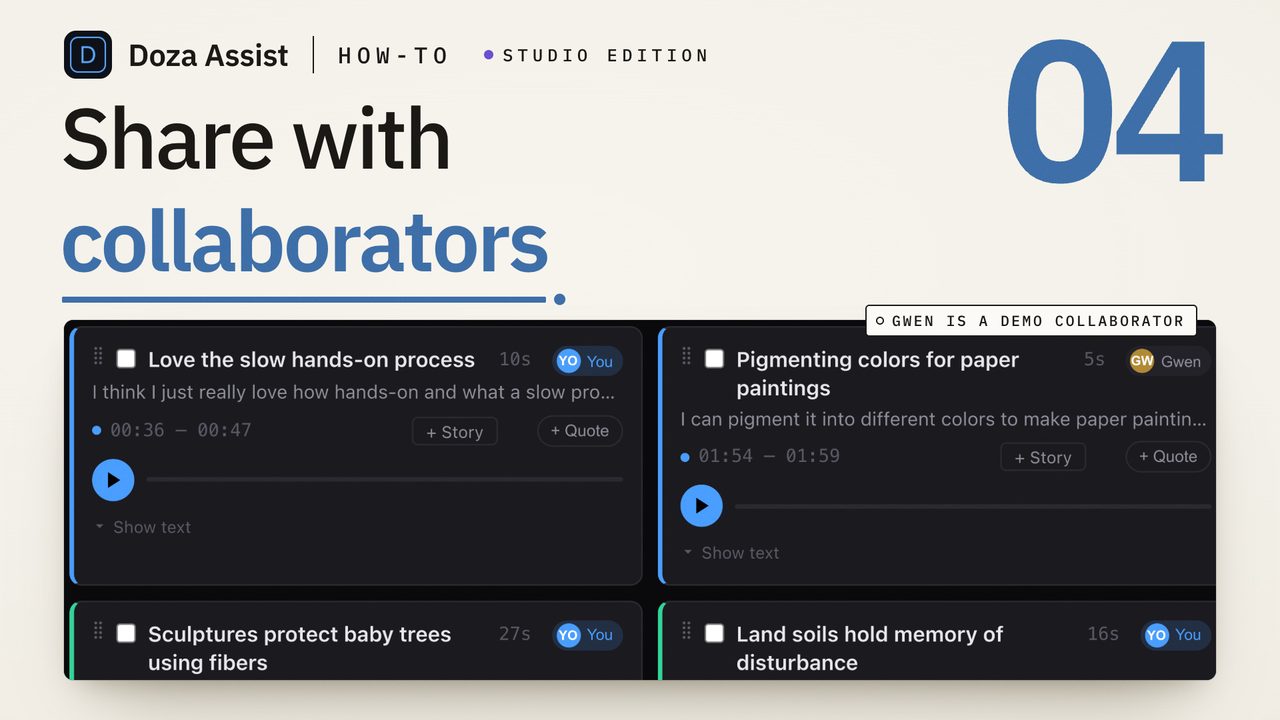
Share publishes one interview (or a whole collection) to a private link on share.doza.ai. Your collaborator opens it and gets the transcript, the audio and the speakers. They can highlight lines, make clips with a note about why, and leave comments. If you allow it, they can connect the link to their own AI assistant and ask it to find the moments. You decide whether they can use their own AI, add a passcode if you want one, and expire the link whenever you like. Everything they make syncs back into your project, ready for the timeline.
01How it works
- Publish from the project. Open the Share sheet on any project or collection and publish. Doza Assist uploads the review page, a compressed audio track, the transcript, analysis, clips and documents to share.doza.ai. The video never leaves your Mac.
- Send the link. Paste it into an email or a message. Add a passcode if the material is sensitive. No account on their side, nothing to install.
- They work the interview. Word-level playback, speaker labels, search. They highlight the lines that matter, pull clips with a note about why, and comment where they disagree.
- It lands in your Doza Assist. Their highlights, clips and comments sync into your project while it is open, every 30 seconds by default. You review, keep what works, and send it to Final Cut Pro, Premiere Pro or DaVinci Resolve like any other select.
02What a collaborator can do
Every link gives them the same tools; only their own AI waits for your say-so. They can:
- Highlight any stretch of the transcript, in the same five colors you use in the app.
- Make clips with in and out points on the word, plus a short note on why this moment.
- Comment at any moment; each note is pinned to that point in the audio.
- Ask their own AI. When you switch it on for a link, they can connect it to Claude, ChatGPT or any assistant that speaks MCP and ask it to find the moments, with the same transcript you have.
Your video never uploads and the audio has no download button. They cannot see other projects or change anything in your app. An expired link stops working at once.
03What you control
- Settings per link. Their own AI on or off (off by default), documents in or out. Change it any time.
- Passcode. A second factor on top of the link for client work under NDA.
- Expire. Take the link down any time with Expire link. Their work is pulled into your project first; then the hosted copy, the audio and every collaborator note are deleted from the server, not just hidden. If the interview is also in a shared collection, its copy stays until you unpublish the collection.
- Retention. A link expires on its own 90 days after the last activity (30 to 365 in Settings). The panel warns at 14 and 3 days, and Extend 90 days resets the clock.
Collection links are simpler: one link for every interview in the collection, with no passcode, AI or documents switches, and no automatic sync or expiry. Bring their work in with Pull collection feedback and take the link down with Unpublish.
04Their AI, your transcript, your rules
The same open standard (MCP) that lets Claude Desktop or Cursor read your projects on your Mac also works for a collaborator on a share link, through a separate hosted connector that reaches only the share links they have opened, never your Mac. When you allow AI on a link, they connect it once and can ask their assistant "find every moment she talks about the merger" or "pull the three strongest lines about the second half." The assistant reads the shared transcript, makes labeled selects, and those selects come back to you the same way a hand-pulled clip does. Switch AI off for a link and the Ask your AI button disappears; a connected assistant can no longer read that transcript or add selects to it.
We believe collaboration is where a cut gets good, and that it should not cost you control of the footage. Share puts the smallest possible thing on a server, a compressed audio track, the transcript, analysis, clips and documents behind a private link, and keeps every decision with the editor. The people you invite get real tools, not a comment box. You get their judgment back in your timeline instead of in a spreadsheet.
05What is on the server, and what is not
| On share.doza.ai | Stays on your Mac | |
|---|---|---|
| Video and original media | Never | Always |
| Audio | A compressed copy, for playback | Original |
| Transcript, speakers, timing | Yes, behind the link token | Yes |
| Analysis, labeled clips, quote sheet, documents | Yes, behind the link token (documents only while Include documents is on) | Yes |
| Collaborator highlights, clips, comments | Until the link expires | Synced into the project |
| Your other projects | Never | Always |
| After the link expires | Everything deleted (unless a shared collection still includes the interview) | Everything kept |
06Which plan includes Share
Share is part of Doza Assist Studio ($299 a year, or $29 a month) and of Enterprise for teams. You can try it before paying: the free trial of Doza Assist (Studio) includes two share links with every Share feature, on the first two minutes of any file. Download the Studio build, publish a link, send it.
07Frequently asked
Does my collaborator need a Doza Assist license?
No. A link and a browser. The license is yours; the link is theirs to use until you expire it, or until 90 days pass with no activity (Extend 90 days resets the clock).
Can they download the audio or the transcript?
Playback and reading, yes, that is the point. The audio has no download button, media requests are gated per link, and the video is never uploaded at all. Documents are your call: while Include documents is on (the default), the link’s Documents tab lets them download the transcript, your selects and the quote sheet as Word, PDF or Excel. Switch it off to remove that tab; a quote sheet you’ve made stays downloadable as PDF or Word from its own view.
What if the client's AI is not Claude?
MCP is an open standard. Any assistant that supports it can connect to the link, including ChatGPT, Cursor and VS Code based tools. You can also keep AI off for a link.
What happens to the shares if my Studio subscription ends?
Existing links stay readable for your collaborators, but you can no longer publish new shares or change existing ones until the subscription is active again. Expiring a link always works.
Can I try Share without paying?
Yes. The free trial of Doza Assist (Studio) includes two share links with every Share feature (on the first two minutes of any file). Publish a link, send it to someone, watch their selects come back. Studio makes the links unlimited.
Is Share in the one-time license?
No. Share comes with Studio and Enterprise; the one-time license itself stays exactly as it is.