How to pull quotes from an interview transcript.
A transcript is where you find quotes, not where you check them. The one-read pass that gets clean, attributed pull quotes out of an interview, and what to check against the frame.
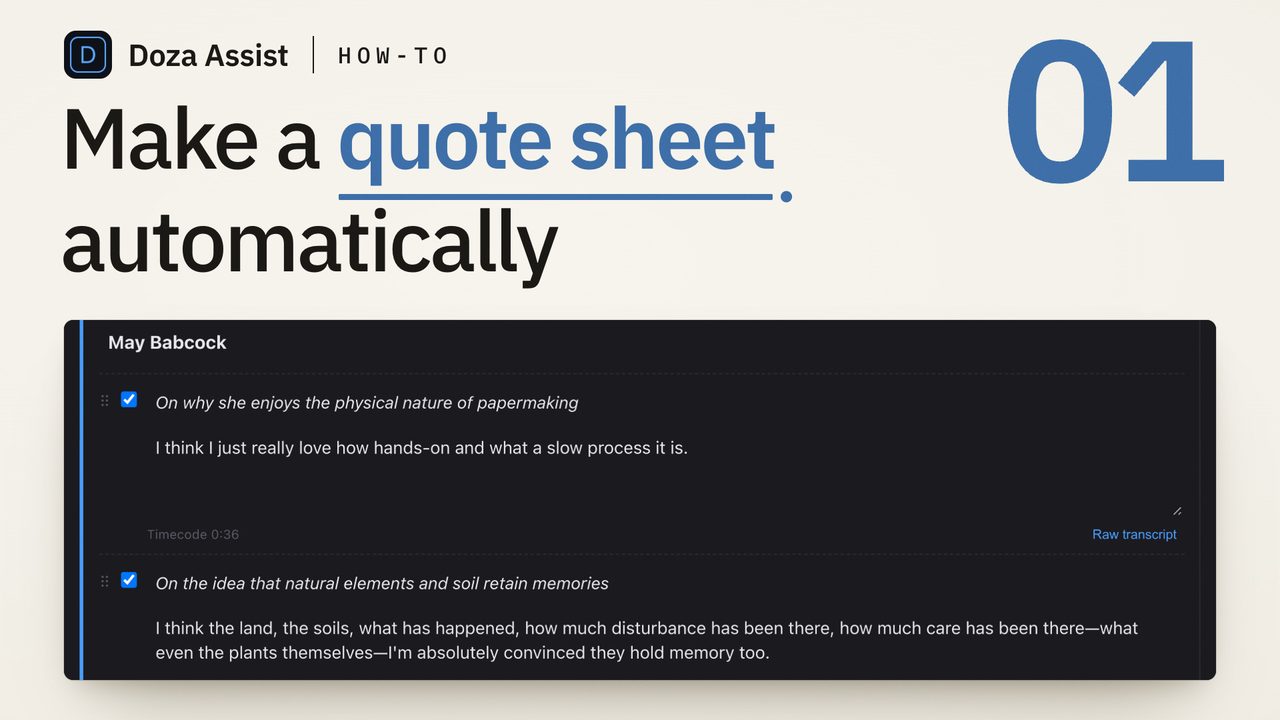
To pull quotes from an interview transcript, read it once and mark only the lines that stand on their own without the question. Trim each to a single thought, then play every marked line against the recording and fix the wording to what was actually said. Attach the speaker's name and the timecode, and put the keepers on one page. Find in text; verify on the frame.
Why the transcript is for finding and the recording is for checking
You can read a transcript far faster than you can listen to the interview, and you can search it. That is the whole reason to pull quotes from text: an hour of conversation becomes pages you can scan with a pen, and "the bit about the merger" becomes a search for the word.
What a transcript cannot be is the final authority on what was said. Automatic transcription gets most words right and the wrong ones are the expensive ones: a name, a number, a dropped "not", a homophone that flips the meaning. A quote that goes to a desk, a client or a lawyer has to match the audio, so the pass has two stages that should never be merged. Find in the text. Check on the frame.
A pull quote and a sound bite are the same editorial act in different media. The bite is heard in a cut; the pull quote is read, in a press release, a case study, a caption, a report. The lines you pull for one are usually the lines you pull for the other, which is why editors and comms people can work from the same transcript pass.
What makes a line quotable
Four tests:
- It survives without the question. Cover the interviewer's line. If the answer still makes sense, it can be quoted. "Yes, because the budget was gone by March" needs a fix; "The budget was gone by March" does not.
- It is one idea. A quote that carries two points reads as a paragraph. Split it or pick the half you need.
- It is specific. A number, a name, a date, a picture. "It was a hard year" is filler; "We cut the crew from forty to nine" is a quote.
- It fits in a breath. Long enough to be a complete thought, short enough that a reader does not lose the subject before the verb.
The steps
- Decide what the quotes are for before you read. A press release, a case study, a lower-third, a summary for a producer who was not in the room: each wants a different line. Write down the two or three topics the piece needs. Reading it again for a topic you did not plan for is where the time goes.
- Read once and mark only the stand-alone lines. Go top to bottom with the four tests above. Mark, do not collect: a transcript with everything you liked highlighted is a shorter transcript. Note the topic beside each mark.
- Trim each mark to the thought. Cut the run-up ("I think, you know, honestly") and the trailing clause that starts a new idea. Do not rearrange words. If you remove something from the middle, show it with an ellipsis; if you add a word for sense, put it in brackets. A quote that needs three brackets is not a quote.
- Play every marked line against the recording. Jump to the line and listen with the text in front of you. Fix names, numbers, negatives and anything that reads oddly. This is the step people skip and the step that gets a correction printed. If the speaker misspoke and then corrected themselves, quote the correction.
- Attach the name, the title and the timecode. Full name as the speaker gives it, a title that will still be true on the day the piece runs, and the timecode of the first word. The timecode lets anyone check the quote later and lets an editor find the line in the cut.
- Put the keepers on one page in order. Group by topic, strongest first inside each group. One quote per entry, the attribution under it, the timecode at the end of the line. Send it as a PDF or a Word document; the person receiving it should never need the transcript.
How to clean up speech without changing it
Every quote from spoken English has been cleaned a little, and the convention is the same in newsrooms, comms teams and documentary. Drop the disfluencies: "um", "like", the false start, the repeated word. Keep the grammar the speaker used, even when it is loose; tidying it into written English makes everyone sound the same and makes the quote sound like you. Never change tense, number or the order of ideas. If the line only works with a word swapped, it was not the line.
Two habits save arguments later. Keep the speaker's exact wording in the timecoded entry even when the piece will shorten it. And when a quote is cut from two places in the same answer, mark the join; a reader who finds an unmarked seam stops trusting the page.
When one interview is not enough
A case study, an event recap or a series piece pulls from several interviews, and the page gets harder to manage once the quotes come from different files. Add the recording and the speaker to every entry, even when there was one speaker per file. Sort by topic across all of them rather than by interview, so the reader sees the best lines about the launch together instead of hunting through five sections. It is the same method as building selects for a cut, done on paper.
Doza Assist transcribes the interview on your Mac with every voice labeled and ranks the strongest soundbites across the whole interview, so the candidates are already marked when you open the transcript. Click any word to jump to its frame and check it against the audio; double-click to fix a misheard word, and the timecode never changes. Tag the clips you want quoted and Quote Sheet writes the formatted document, one quote per clip with a topic line, the speaker's name and the timecode, exported as PDF or Word. Rename a speaker once and the name flows through to the sheet. Nothing uploads, which matters when the interview is with a source who was promised it would not.
Common questions
What is the difference between a pull quote and a sound bite?
The medium. A sound bite is heard in a video or audio edit; a pull quote is read on a page or a screen. Both isolate the line that best carries the speaker's point, and the same transcript pass finds both. A pull quote can run a little longer, because the reader controls the pace.
Is it acceptable to clean up a quote?
Yes, within the convention: remove disfluencies, false starts and repeated words, and leave everything else alone. Do not change tense, number, word order or meaning. Mark any cut inside a quote with an ellipsis and any added word with brackets, and keep the exact wording on file with the timecode.
Do I need a timecode on every quote?
For anything that will be checked, yes. The timecode lets a producer, a press officer or a fact-checker find the line in the recording instead of listening for it, and lets an editor cut the same line without searching. Leave it off the published piece; keep it on the sheet.
How many quotes should I pull from one interview?
Fewer than you marked. An hour of interview yields a handful of lines that pass all four tests for a given piece, and a page with eight strong quotes beats a page with thirty. Pull by topic rather than by count: when each topic has its best two or three lines, stop.
Can I pull quotes without listening to the recording at all?
You can find them that way; you cannot sign off on them that way. Automatic transcripts get the wrong word in exactly the places that matter in a quote, and a published misquote costs more than the minutes it takes to play the marked lines.
Doza Assist transcribes every interview locally, finds the strongest moments across all of them, then sends your chosen ranges to Final Cut, Premiere, or Resolve. Your video never leaves your Mac.
Free trial: every feature on your first 2 minutes — no account, no card · 30-day money-back guarantee · Requires a Mac with Apple Silicon (M1 or later)