

One housekeeping note first. Every edition of Doza Assist is now the same app with the same features: the direct download, the FxFactory edition and Studio. Studio adds Share on top. If you are on the direct download, the app offers 1.1.1 itself under Check for Updates. On FxFactory, update through the FxFactory app. Studio has already updated itself.
Here is what is in it.
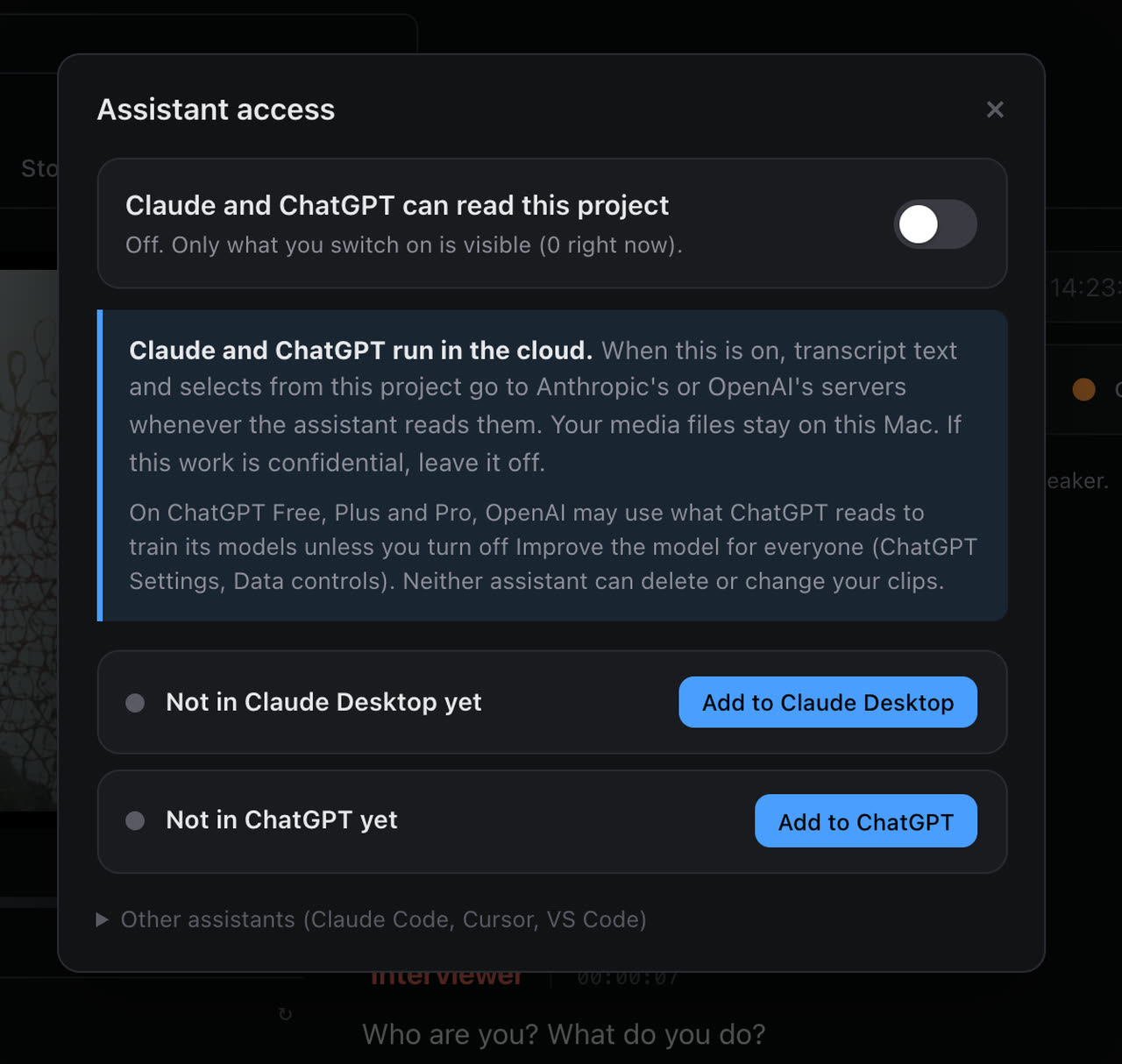
Use Doza Assist in ChatGPT and Claude.
In 1.1 I shipped a connector for Claude Desktop, and the reaction told me something: a lot of you live in ChatGPT, not Claude. So 1.1.1 connects to both. Open Assistant access on any project, click Add to ChatGPT, and ChatGPT for Mac can read that project: the transcript, your selects, the story so far. Ask it where she talks about her father, have it pull every moment that would work as a cold open, and the clips land in your project. Codex, Cursor and VS Code connect the same way.
It is still off by default and still per project. Only the projects you switch on are visible to an assistant, and your video never leaves your Mac. The panel says plainly that Claude and ChatGPT run in the cloud, so you can decide project by project.
Fast transcription in 25 languages.
Until now only English ran on Parakeet, the fast engine. Every other language went to Whisper, which is accurate and slow. With Parakeet v3, English plus 24 European languages transcribe on the fast engine, on your Mac: French, German, Spanish, Italian, Portuguese, Dutch, Polish, Ukrainian, Russian, the Nordic languages and more. A 27-minute interview in German now transcribes in the time it used to take to open the project. The model downloads the first time you pick one of these languages, with its progress on screen, and batch imports pick the right engine for each file.
Long files are transcribed in chunks, and words at the joins could be doubled or dropped. They are not any more.
Tell Doza Assist what you are making.
There is a new line at the top of every project: "What is this piece for?" Write one sentence, "a 90-second donor film about the new wing," and AI Analysis, Story Builder, the Story Brief and chat all gear their picks toward that goal. It is optional. Leave it empty and everything works as before. Fill it in and the difference is immediate: Story Builder fills a runtime with the material that serves the piece first, not the moments that merely scored highest.
Story Builder sees the whole interview and lands on length.
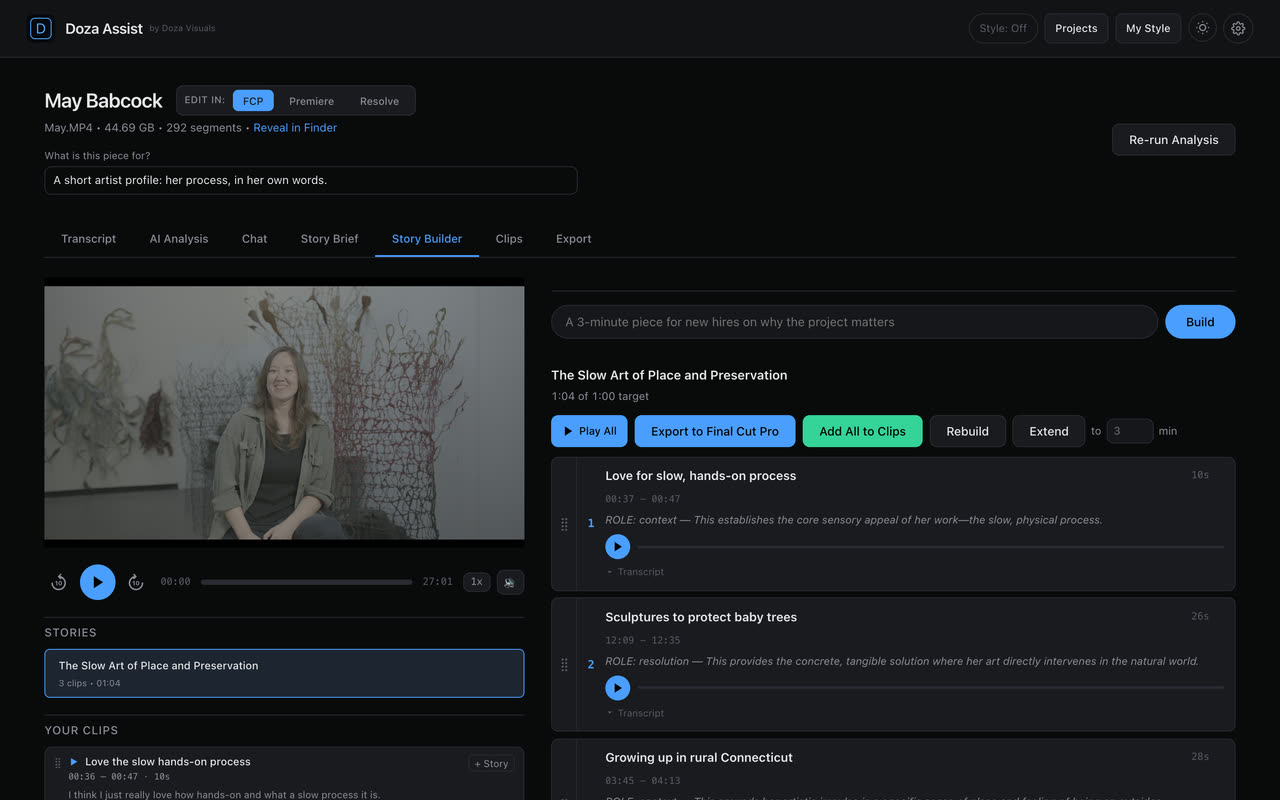
Story Builder picks from a map of the interview's moments. On long interviews that map used to have holes, so a "piece about her background" could come back about something else because the background section was never on the menu. Doza Assist now cuts the interview into moments itself and the AI only labels them. Every minute is on the menu. Projects analyzed with an earlier version get a one-line note and a Rebuild moments button.
Ask for a minute and you get a minute, within ten percent, trimmed on sentence ends. The open story shows its runtime against its target. Ask for more and it extends from where it is instead of starting over. And when your prompt names a subject, Story Builder chooses moments about that subject before higher-scored moments that are not.
Clips play the way you cut them.
This one came from a fast talker. The player used to stop up to a quarter of a second late, which in a quick interview was enough to hear the first syllable of the next sentence. Every clip now stops within a few milliseconds of its out point, and starts on the first sound of the first word. AI Analysis items, chat clips and Story Builder cards play from the same edges a saved clip and an export use, so what you audition is what you get. There are 10-second back and forward buttons beside Play now, with J and L on the keyboard.
Speakers get real names, including yours.
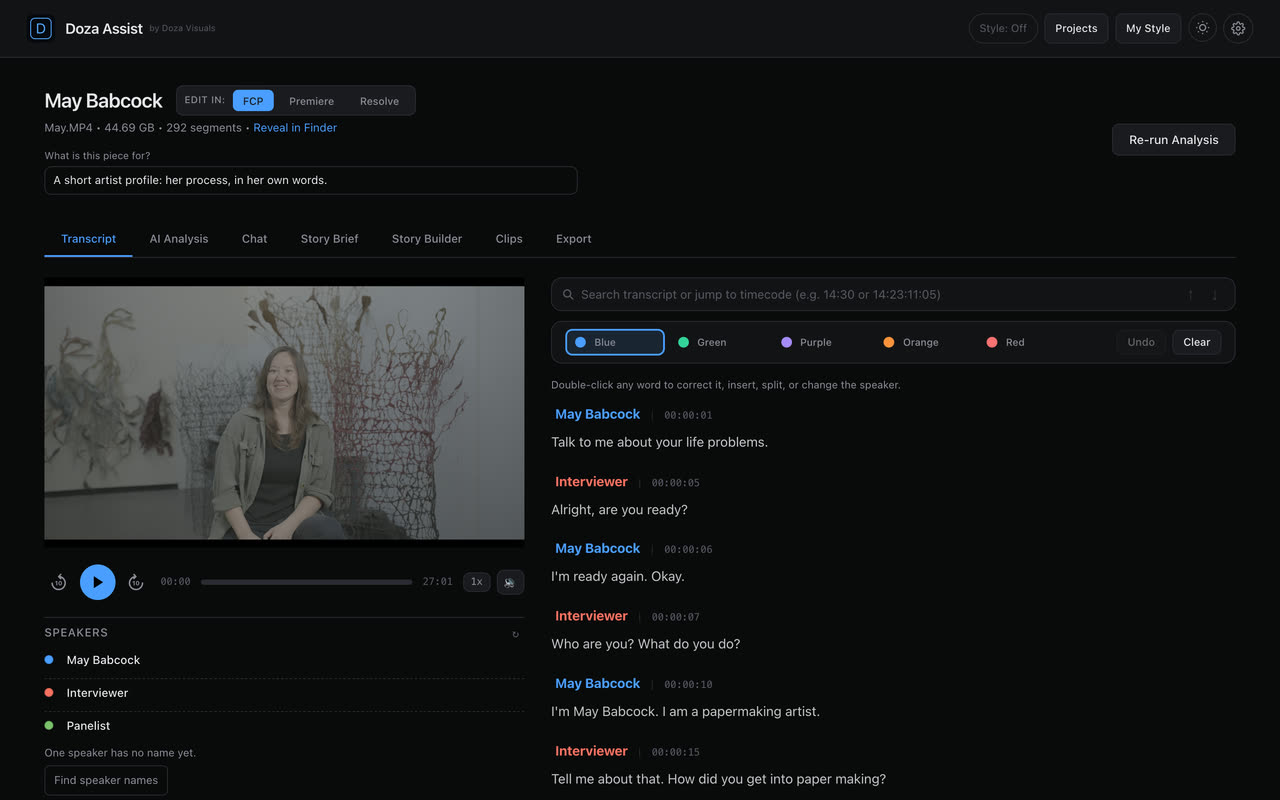
When the project's Interviewer field holds your name, Doza Assist gives it to the speaker who asks the questions, even when the AI only came up with "Reporter." A Find speaker names button sits in the Speakers panel whenever a speaker is still unnamed, and names arrive without reopening the project. Speaker detection also finds the speaker count itself. Nobody asks you "how many speakers?" any more.
The smaller things that add up.
My Style puts your own notes first and lets you set your typical clip length. Chat answers the follow-up you asked, not the one before it, and "two or three moments for each theme" gives you clips for every theme. Soundbites arrive named. Time remaining is honest: it starts counting when the analysis actually starts, so a five-minute queue no longer reads as eighty minutes remaining. Synchronized clips import straight from a Final Cut Pro browser export. Exports keep your clip titles. 8 GB Macs are stable through a full analysis. And if the AI model or the speech engine ever goes missing from disk, the app notices at start-up and downloads only what is missing.
Full notes, all nineteen sections: doza.ai/changelog/1.1.1
Studio gets everything above plus Share updates: a Documents tab on every share link with the transcript, selects and quote sheet as Word, PDF or Excel; collections that share fully; and a privacy note on every reviewer page that says exactly what is sent. Compressed audio, transcript, clips and documents. Never your video.
If you open 1.1.1 and something still is not right, write to me. That is how everything above got built.
ChrisDoza Visuals